
Mastering Efficiency in Excel: The Power of LET Formula
Create complex logic in one single formula

Have you ever wondered what would it be if the users could create variables inside Excel formulas? If you are coming from any programming background you would understand the importance of variables and how easy it makes the life of programmers.
Unfortunately, Excel users did not have the privilege of using variables in formulas until the introduction of the LET formula.
What exactly is the LET formula?
The LET formula allows users to declare variables inside it and use them later in the formula.
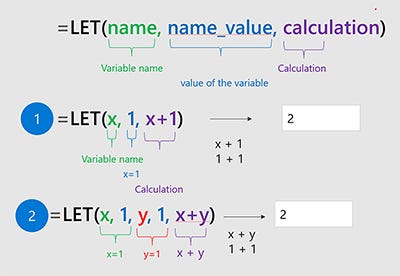
Now one may ask, what are the advantages of using it?
Faster Calculation: If you are using a particular formula again and again in your workbook then you can use it to generate the results in one go which naturally improves the efficiency of the workbook.
Better Readability: It improves the readability of the formulas as multiple sub-formulas live in one big formula with better formatting. This improves debugging and helps the user to write complex formulas.
However one needs to be aware that the variables declared inside the LET formulas will only be available inside the scope of the formula and will not live outside the formula.
If you have any other questions related to hashtags in Excel formulas, comment below; I would be happy to help.